Word Games - from magic square to digital masterpiece
It is thought that the earliest evidence of humans playing with words dates to the ancient Greeks and Romans inscribing palindromes (sentences which can be read from back to front) on their walls. The famous palindrome ‘Sator Arepo tenet opera rotas’, which means ‘the sower Arepo works with the help of a wheel’, was found in square 2D form in the ruins of Pompeii, buried in 79 a.d. This is the first example of letters being laid out on a square board as wordplay, and has been nicknamed ‘The magic square.’ Some have attributed Christian meaning to it, while others claim it has ties to witchcraft.
The ‘magic square’
The emergence of word games as a genre flourished in the late 19th and early 20th Century, when society was developing an increasing interest in word and letterplay. It is during this time that Lewis Caroll, author of Alice in Wonderland, invented the popular ‘Word Ladder’, and that the first crossword was published. Newspaper crosswords turned into a veritable craze by the 1920s and are still published today.
The first crossword, published 21st December 1913
This craze led to the invention in 1938 of what would become the legendary Scrabble, first named ‘Lexiko’ and then ‘Criss-crosswords’. Many more games were derived from this format, but the next revolution in the world of word games is arguably the switch to digital. With third-party apps available from 2008 on the iPhone, the way was paved for a multitude of new word games. Many were simply cardboard copies of Scrabble, but some were more imaginative.
A rather raunchy advert for Scrabble in the 2000s
Words with Friends was the first word game to boom and become a must-have app. People used it to stay in touch with friends and relatives in a fun way. While Words with Friends is now somewhat in decline, word games are still one of the most searched-for apps on the App Store.
When we created Word Links, we wanted to make a word game with a difference. Word Links is based on QB, invented by John Chambers. QB is made up of single-lettered and double-lettered 6-sided cubes (try saying that 10 times over!) which radically expands the possibilities of playable words.
The Word Links board and cubes
We translated and adapted this when we made Word Links, which means it is a word game like no other on the App Store. With the expanded range of words you can play you will find yourself challenged to bring out the best wordsmith in you, and yet the game is surprisingly easy to play for the less ‘wordy’ of us out there.
If you want to find out more about the making of Word Links, head over to our Youtube channel!
What will the next revolution in word games bring? Have your say and tweet us @fatfishgames or comment on Facebook.
Mobile App Talk Level 1: Complete!
Our mobile apps talk yesterday was a huge success, with a great group of people giving their views on the app and mobile gaming world. We welcomed students, professionals, and like-minded app-lovers to our fun feast full of discussion and debate.
We talked about our willingness to pay for an app or a game, and whether we were ever tempted to buy in-game power-ups or accessories. Most agreed that if the app has a specific purpose, or if the quality of the game is excellent, it is worth paying for.
Some of us admitted to turning to power-ups at times, either to give that little extra boost needed to pass a level, or just to make the game more fun.
It was interesting to hear what everyone’s favourite games of the moment were and to compare which apps we used the most.
Amongst the pizza and doughnuts, we managed to fit in a play session in which everyone had a go at our own games, Word Links and Bubble Shot.
We ended on a constructive note by receiving some much valued feedback on our games. This was the first of many App Talk sessions we’ll be holding so watch this space if you missed out this time round!
Thanks to @FatFishGames for a great seminar on mobile apps!
— Jos van der Steen (@Jhdvds)
Update 1.7.5 has released, which brings you even more regular improvements and features for your favourite word game. Here is what’s new:
PLAY A FULL GAME WITH WENDY WORD LINKS
We have improved the tutorial for the game, which we hope will help new players understand how Word Links plays and introduce the overall gameplay process at a leisurely pace.
With this addition, the tutorial now behaves like a full game between you and Wendy. After the first initial tutorial steps players will be allowed to carry on playing Wendy or enter the main menu and challenge a real-life Word Links player.
AND THE REST…
Lots of bugs have been squashed, graphics improved, more support for iOS7 players and, of course, there is even more great features to come in the next update, coming soon!
Be sure to rate and review this update on the App Store and also send us your feedback on twitter @FatFishGames, on Facebook and on our new site www.fatfishgames.com.
Word Links iOS Update 1.7.4 Releases
We are super exited to announce that the latest update for Word Links is now available to download/update from the Apple App Store.
Our Word Links team have been busy enhancing your Word Links experience with some great new features as-well-as fine-tuning existing ones. So let’s find out what is new…?
Head-to-Head Comparison
Tapping on an avatars (or on particular areas of the game) you will now get a head-to-head comparison table between yourself and the person you selected.
This will help assess your ability against the player or help you compare yourself with players higher up the leaderboards, or even your playing friends and family.
Challenge Friends
Challenging your friends or other Word Links players is now much more easier. Simply select an opponent and select Challenge from the head-to-head screen. This makes it much easier to find and compete with players of your level, especially if you use this feature together with players near you on the leaderboards.
Activity Log
One key feature we’re super excited to bring you is the Activity Log. Replacing our old ‘News bar’, this Activity log is located on the main menu and by simply tapping on it will bring down your personalised activity log, which will display a variety of Word Links-based info.
From catching up on recent chat messages to viewing recent moves and friends activity, everything goes through our Activity Log. Messages rotate in the main bar, and if anything catches your eye, simply tap on it to view it in more detail in the open Activity Log.
We have many more ideas to come in this area, so lookout for a future update on the Activity Log soon.
New Leaderboards
Joining our Global Rank leaderboard we have added three new leaderboards to Word Links; Average points per turn, Best Score Per Turn and Best Score Per Game.
The leaderboards are a great way to see how you match up against other Word Links players, and with a simple tap of a row you can challenge them too!
Main Menu
With all these new features we need to give you some way to get to them, right? We have updated the menu with two new buttons at the top that will take you to your Achievements and Ranking and Statistics sections. We’ve also added a new suggested friends area so you can quickly start a new game if you find yourself short of someone to play.
iOS 7 Fixes
We have been monitoring iOS 7 closely over the past month and 1.7.4 addresses a few bugs that the new software update from Apple brings. So if you are running the shiny new iOS 7 update, we recommend that you update Word Links too.
Also, make sure you have Auto App Updates turned on in your iOS 7 settings. With this new iOS 7 feature on, you can be sure that you will always have the latest version of Word Links as soon as they are released on the App Store.
More to Come!
As always, we have lots more features and improvements coming to Word Links over the coming weeks. So stay tuned to the blog and our twitter feed for any new announcements.
Until then, we hope you enjoy v1.7.4 of Word Links.
Word Links iOS Update 1.7.2 Releases
We are happy to announce the latest update for Word Links is now available to download/update from the Apple App Store.
Our team have been busy putting in some great new features into Word Links as-well-as fine-tuning existing ones. So what is new…?
New Buttons & Sounds
We have given main buttons in the game a new lick of paint and also enhanced a few sounds.
Global Leaderboard Ranking
Want to know how you rank around the world in Word Links. Tap on the stats button on the main menu and enter the Global Rank section to see where you place.
We have many more leaderboards planned in future releases so stay tuned for more announcements on those soon. You will also be able to directly challenge opponents ranking higher and lower than you on the leaderboards.
Improved Statistics
We have enhanced the statistic areas with graphics and even deeper stats for Pro users of the game. The differences between Pro and standard versions of the game will more clear in a future release.
More Wendy
We have improved and added Wendy Word Links in more locations to guide you through certain aspects of the game and we have much more to come in future updates.
In the next update we have some more goodies to enjoy including: activity log, head-to-head comparison and challenges. So stay tuned to the blog for more updates as soon as we have them.
Until then, we hope you enjoy v1.7.2 of Word Links.
Word Links Update 1.7.1 Releases
We recently rolled out an update for Word Links iOS. Over the coming weeks gamers will start to see more rapid updates for Word Links as we ramp up the production of adding new features and tweaks to the unique word game.
Update 1.7.1 kicks this all off with a few minor tweaks around the game. However the next update will feature some exciting updates, including global leaderboards, improved help from our Word Links mascot - Wendy - and a whole bundle of improvements.
Stay tuned to our blog and also our Twitter and Facebook timeline for all the latest announcements for our word game - Word Links.
Word Links iOS Update 1.7 Releases
Today we have released update 1.7 of Word Links on the Apple App Store for both the Free and Pro versions of the game.
Since the last update we have been very busy adding some very big features into the game, and it is in update 1.7 that you will see the beginning of these big improvements and features. Let’s fill you in on some of the highlights…
Power-Ups
You will see that we have rearranged the bottom of the game area to include a ‘Powers’ button. Tapping on this ‘Powers’ button will open up the power-Up draw, where you can use up to four powers to enhance the game and the words you play.
Best Word
If you find yourself stuck on what word to play next, let the Best Word power-up help you out! Using this power-up the game will take a look at your current game board and it will show you a list of high-scoring words that you can play against your opponent.
Premium Words
For an additional one time cost, or free for Ultimate Word Pack players, you will have access to the highest-scoring words available in the game.
Power Swap Joins Cube Swap
Like the previous Cube Swap, we have introduced a new Power Swap power-up. Unlike cube swap, which gave you a random cube back from the cube bag, with Power Swap you get to choose the actual cubes you want, which allows you to play the word you want to against your opponent.
Word Meter
This power up allows you to see the strength of your played word before you play it, so that you can try to play an even higher word knowing that the current one may not be the strongest.
Word Definitions
Have you ever wondered what the word played by your opponent means? Then let our new Definitions rollout tell you. Located around Word Links is a blue Definitions icon. Tapping this button will open up the dictionary definition of the word. Definitions can also be checked during a game for any word last played. This can be toggled by tapping the score bar at the top of the game board.
Live Scoring
For Ultimate Word Pack members only, the Live Scoring power-up lets you instantly view the total score of your word as you place your cubes down on the game board, which saves you time adding them up manually and lets you concentrate on the words you make!
Improved Shop
To purchase any of these power-ups you can visit our new shop in the game where you can buy small items to the big Ultimate Word Pack.
Ultimate Word Pack
For extreme wordy gamers, you can purchase the Ultimate Word Pack. This pack stocks-up on all the very best features and power-ups in Word Links for one single payment. Check out the shop for the full list of what Ultimate Word Pack unlocks.
New Achievements
To coincide with the power-ups, we have added four new achievements to our achievements list. These are:
- Leave Nothing to Chance: Use a Power Swap Power Up
- Nothing but the Best: Use the Best Word Power Up
- What’s it Worth: Use the Word Meter Power Up
- Hat trick: Win 3 Games in a row
We can’t wait to see what you think of this update, including all the improvements we have made to the game. Remember to update or leave us a review on the App Store and invite your friends or family to a game on iOS, Android or on Facebook.
Word Links iOS Update 1.6 Releases
We are happy to announce that iOS Update 1.6 (Free and Paid) is now available to download for our multi-platform word game - Word Links.
In this latest update we have a number of exciting new headline features for you wordy gamers! So here we are again with a rundown of what is new in this update…
Achievements
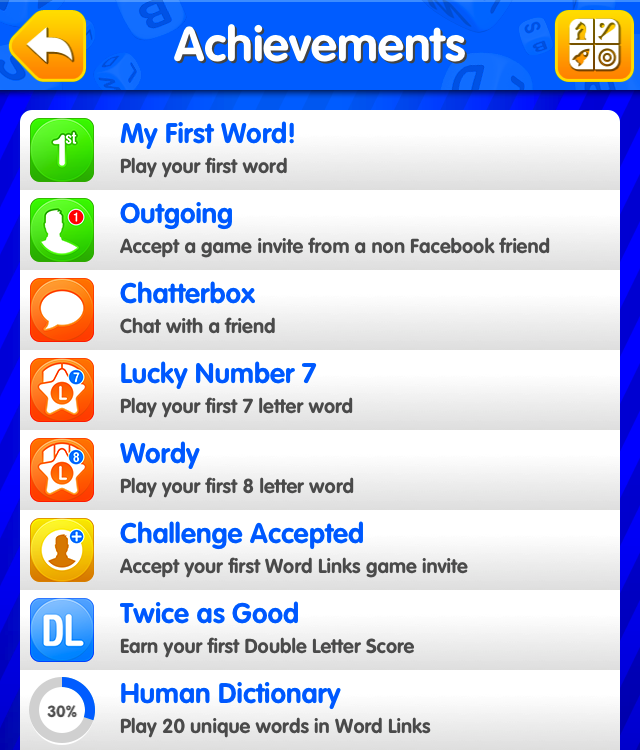
New to Word Links, you can now unlock over sixty achievements within the game. We have spread out a number of easy through to challenging achievements throughout Word Links and we hope you enjoy unlocking them. Tap on the new achievements button to view which you have unlocked and look out for the achievement panel that will drop into view as soon as an achievement has been unlocked.
We have hooked these challenges into Apple’s Game Center too, so if you have a Game Center account, log in and start earning those achievements for your Game Center profile!
My Statistics
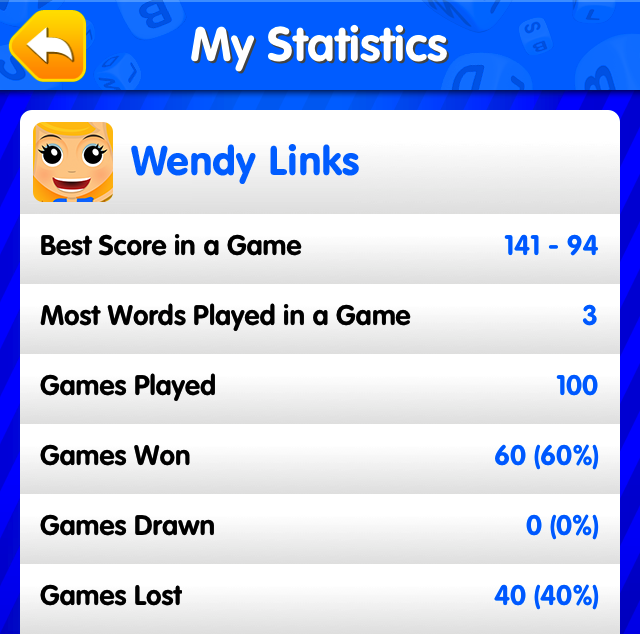
We have added a player statistics section into Word Links. From here you can view a variety of in-game stats for your profile. This will make more sense in a future update, but in Update 1.6 you can check your best game, longest word and biggest margin, to recent form and longest winning streak.
Tapping the Game Statistics button at the bottom of this section will display all the people you have played and your Win, Lose or Draw results against them too!
Menu UI
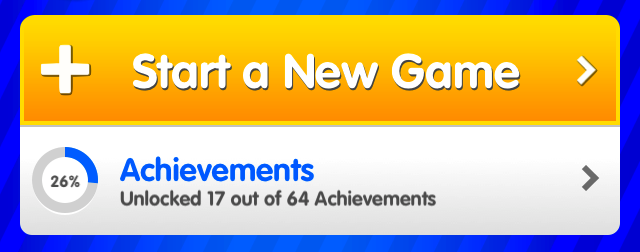
We have updated the main menu with improved visual elements. On the main menu there is a new achievement button/area that will display how many of the achievements you have unlocked. Tapping this will take you straight into the Achievements section.

We have also made it more clear in the main menu’s Game Over area if you have won or lost a game. So at a glance you can see your state of play within all played games of Word Links.
Improved Dictionary
In this release we have improved on the dictionary within Word Links. The game now supports over 180,000 extra words!! Speed has also been greatly improved and this will help with a new feature that will be coming very soon! :)
Improved Facebook Integration
For those who log into Facebook you will also find improved integration with Facebook. Most of this is behind the scenes but Facebook users may see a few new prompts when sharing your moves on Facebook.
We hope you enjoy this update. We are hard at work with Update 1.7 which will bring lots of exciting features that we will unveil very soon.
Word Links Android Update 1.4 Releases
We have hit the switch on Android update 1.4 of Word Links. So head over to Google Play now.
In this update 1.4 we have squashed a number of bugs and made many improvements to the game under the hood as well as improve the inviting friends.
Update 1.5 of Word Links (Free) is now available on the App Store!
We are pleased to announce that the next update to Word Links has been approved by Apple and is now available to download from the App Store.
In this BIG bumper update we have made many improvements and bug fixes to the game, so we thought we should share these changes with you:
Introducing Wendy Word Links!
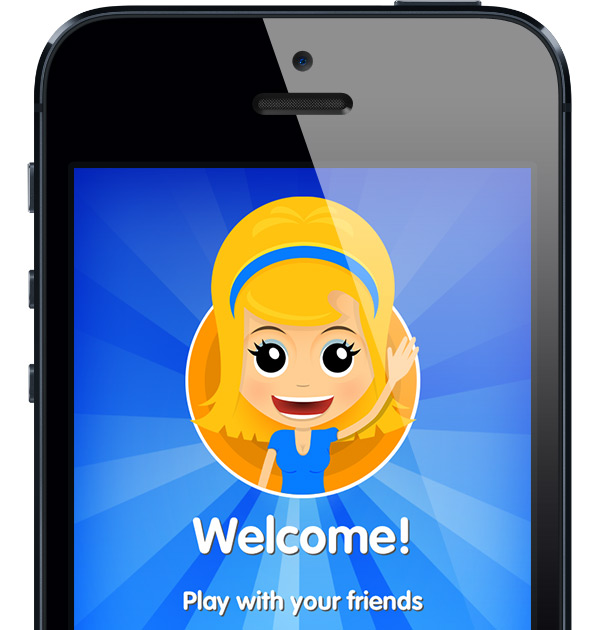
We would like to introduce Wendy Word Links - our Word Links gal who you will see quite often throughout the game. We posted our two characters on Facebook and asked for your votes and “Wordy Girl” Wendy was chosen as your favourite.
Wendy will see you though the sign up process, she will guide you though each step in the tutorial and also congratulate and commiserate your wins, draws and loses.
New Interactive Tutorial
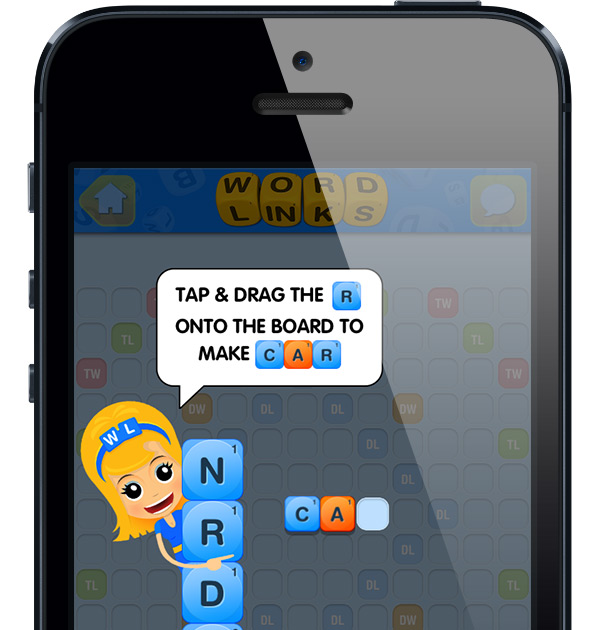
To help better understand Word Links and how simple it is to create and play a word, we have created an improved interactive tutorial when you first log into the game [Note to existing users: you will not see this tutorial unless you sign out and back in again].
This tutorial will help any first time players of Word Links quickly understand the simple steps it takes to view all sides of each cube, placing them onto the board and playing a turn. We’ve tried to keep this tutorial as concise as possible so that the tutorial doesn’t drag on and become dull for first timers. Making it interactive, more understandable and memorable for users was key for us.
My Statistics
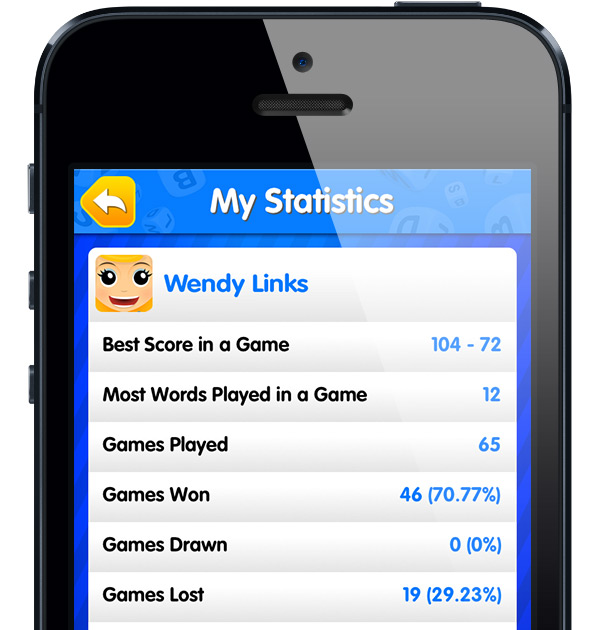
You can now access your Word Links statistics from the home page. Find out your best score in a game, games won, longest word, biggest win margin and much more.
Use these stats to better your game, fine tune your skills and make you a better Word Links player.
We have more stats planned for the near future along with a Word Links world ranking system.
Improved Random Players
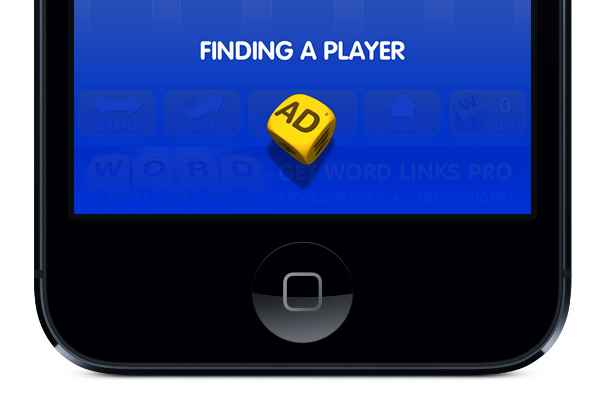
Over the past few weeks we have been fine tuning how random players are found. You will now be matched with eager active Word Links players in the game, so we hope you have a more challenging experience.
Lots of fixes, improvements and new features
As always in every update of Word Links, we have improved on a number of areas on the surface and under the hood too. So we hope you enjoy them and share this update with your friends and family.
The premium version of Word Links is still currently waiting for Apple’s review team and should be with you very soon. So keep and eye on our Twitter timeline, Facebook feed or these very pages for any new updates or news on Word Links.
You can download Word Links from the App Store -http://bitly.com/wordlinks
Play Word Links on your Android device - http://bitly.com/androidwordlinks
Play Word Links on Facebook - http://bitly.com/fbwordlinks
For more information on Word Links visit our micro-site hub - http://www.wordlinksgame.com